Can You Change Your Wix Template? No — Here's What to Do Instead
Short answer: no. Once you create a Wix site from a template, you cannot switch it to a different template. Wix says so plainly in its own help center: the template you pick is the permanent foundation of that site. If you want a different template, you create a new site and rebuild your content in it by hand.
Here's what that means in practice, what your actual options are, and when it's worth moving to a builder where design changes don't cost you a rebuild.
Why Wix works this way
In Wix's editor, your content isn't stored separately from your design — every text box, image, and button lives at a fixed place inside the template's layout. There's no underlying structure that another template could re-render. That architecture is what makes Wix's drag-anywhere editor possible, and it's also why there's nothing for a "switch template" button to operate on.
So when the design starts feeling dated, Wix users have three real options.
Option 1: Redesign your current site in place
You can't swap the template, but you can renovate inside it:
- Change fonts, colors, and page backgrounds across the site from the editor's design panels.
- Rework sections one at a time — Wix's newer editors offer pre-designed section layouts you can drop in and adapt.
- Rebuild individual pages using new strips and sections while keeping the rest of the site intact.
This is the least disruptive path, and for a modest refresh it's usually enough. The ceiling: your site's overall structure, spacing rhythm, and navigation pattern still come from the original template. A renovation can modernize it; it can't make it a different house.
Option 2: Create a new site from a new template
The official path to a truly new design:
- Create a new Wix site from the template you want.
- Copy your content over manually — every page, paragraph, and image. There's no automated content migration between templates.
- Reconnect anything attached to the old site: forms, member areas, apps from the Wix App Market.
- When the new site is ready, transfer your domain to it and (if you pay for premium) reassign your plan.
- Take the old site down.
Budget real time for this. A one-page site is an evening; a multi-page site with galleries and apps is a weekend-plus project — and it's easy to lose SEO along the way if URLs change without redirects.
Option 3: Move to a builder that separates content from design
If the reason you're switching templates is a personal or portfolio site — you, your work, your experience — there's a structural fix available: use a builder where your content is data and templates are just views of it.
That's how we built Unfold. Your experience, projects, skills, and story are stored as structured content, and every template renders that same content differently. The consequences:
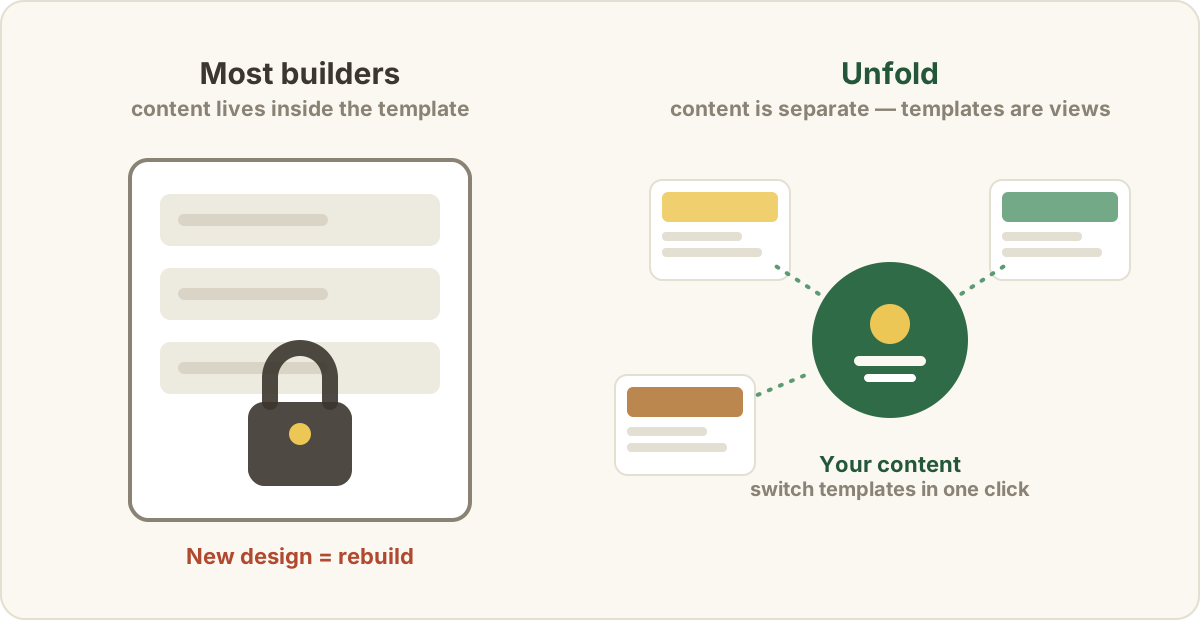
- Template switching is one click, reversible, and instant — all 18 templates, with your real content in every preview.
- Nothing to migrate. Change your mind about the design monthly if you like; your content never gets rebuilt.
- Start from your resume. Unfold's AI turns your resume into a complete website in about a minute, so you're comparing templates with your real site, not placeholder text.
The honest scope note: Unfold is built for personal sites — the site that gets you found and hired. If your Wix site is a store or a booking-heavy business site, Wix's app ecosystem is the point, and a rebuild within Wix (option 2) is probably your answer.
Squarespace users hit a version of the same wall, by the way — template switching there is limited or impossible depending on your version.
Common questions
Can I preview my Wix content in a different template?
No. Because content lives inside the template, Wix has no way to show your existing site rendered in another design. You'd rebuild first, then see.
Will rebuilding my Wix site hurt my SEO?
It can, if you're careless with URLs. Keep page addresses identical where possible, and set 301 redirects for any that change. Also update your sitemap and reconnect your domain promptly so search engines aren't indexing two half-alive sites.
Does the same limitation apply to Wix Studio / the newer Wix editors?
The template-switching restriction applies to Wix sites generally: once a site is created from a template, that template is fixed. Newer editors make in-place redesign (option 1) more flexible, but they don't add a switch-template button.
I'm rebuilding anyway. What should the new site actually contain?
Take the opportunity to fix the content, not just the design. Here's what to put on a personal website — and just as important, what to leave off.