What to Put on a Personal Website: The Complete List
You need six things on a personal website: a clear headline that says what you do, a short about section, proof of your work, your experience, a way to contact you, and one obvious next step for the visitor. Everything else is optional.
That's the short answer. The rest of this guide covers each section in detail — what goes in it, what recruiters actually look at, and the order that works best.
Start with the one-line test
Before you write anything, answer this: when a stranger lands on your site, can they tell within five seconds who you are, what you do, and why they should care?
Recruiters and hiring managers skim. They open your site in a tab next to nine other candidates, glance at it, and either keep reading or close it. Your homepage has one job: pass that five-second skim.
Everything below is organized around that reality.
1. A headline that says what you do
The top of your site — the hero — needs three things:
- Your name. Not "Welcome to my website." Your actual name, large.
- What you do, in plain words. "Product designer who ships fintech apps" beats "Creative problem-solver passionate about innovation." Name your role and your specialty.
- A photo, if you're comfortable with one. A decent headshot builds trust fast. It doesn't need to be professional studio work — clean lighting and a neutral background are enough.
If you only optimize one part of your site, make it this one. It's the part everyone sees and the part most people get wrong.
2. An about section that's actually about your work
Your about section is not your autobiography. It's a short pitch: who you are, what you're best at, and what you want to do next.
A structure that works:
- What you do now — one or two sentences.
- What you've done — the highlight reel, not the full history. Two or three achievements with specifics.
- What you're looking for — the kind of work, team, or problem you want next.
Keep it under 150 words on the homepage. If you want to tell a longer story, give it its own page. We wrote a full guide on this: how to write an About Me page that doesn't feel awkward.
3. Proof of work: projects, case studies, or a portfolio
This is the section that separates a personal website from a business card. Show real work:
- Developers: 2–4 projects with a description of the problem, what you built, and the result. Link the code or the live product.
- Designers: case studies beat galleries. Show the before, the process, and the after.
- Writers and marketers: link published pieces or campaigns, with a line of context on what each one achieved.
- Everyone else: outcomes work in any field. "Reorganized onboarding and cut ramp time from six weeks to three" is proof of work, even with nothing visual to show.
Three strong projects beat ten mediocre ones. Cut anything you'd have to apologize for.
4. Experience and skills — the scannable resume
Recruiters will still want the traditional facts: where you've worked, for how long, doing what. Give them a clean, scannable version:
- Role, company, dates, and one or two lines on what you actually did there
- A skills section that names real tools and competencies, not adjectives
- Your education, briefly
This section can be dense — it's for the reader who has already decided to look closer. Don't pad it. If you're turning an existing resume into a website, this part is mostly done already; a tool like Unfold builds this section straight from your resume PDF.
5. A way to reach you
An email address or a contact form, visible without hunting. Add links to the profiles that matter for your field — LinkedIn almost always, GitHub for engineers, a portfolio network for designers.
Two mistakes to avoid:
- Burying contact info three clicks deep. If someone wants to hire you, make it effortless.
- Listing every social account you have. Your personal site is a curated space — link the professional profiles, skip the rest. (More on this in what not to put on a personal website.)
6. One clear call to action
Decide what you want a visitor to do, and make that the obvious next step:
- Job hunting? "Email me" or "Download my resume."
- Freelancing? "Book a call" or "Request a quote."
- Building an audience? "Read my writing" or a newsletter signup.
One primary action, repeated at the top and bottom of the page. A site that asks for five different things gets none of them.
Optional sections that can earn their place
| Section | Add it when… |
|---|---|
| Testimonials | You have real quotes from colleagues, managers, or clients — with names. |
| Writing / blog | You'll actually maintain it. A blog last updated two years ago hurts you. |
| Speaking / press | You have talks, podcasts, or coverage worth showing. |
| Resume download | You're actively job hunting. Make it a current PDF. |
| Certifications | They matter in your field (cloud, security, project management, health). |
| Now page | You like the format — a short "what I'm focused on right now" note. |
None of these are required. A focused one-page site with the six core sections outperforms a sprawling site with thin pages.
How to order the page
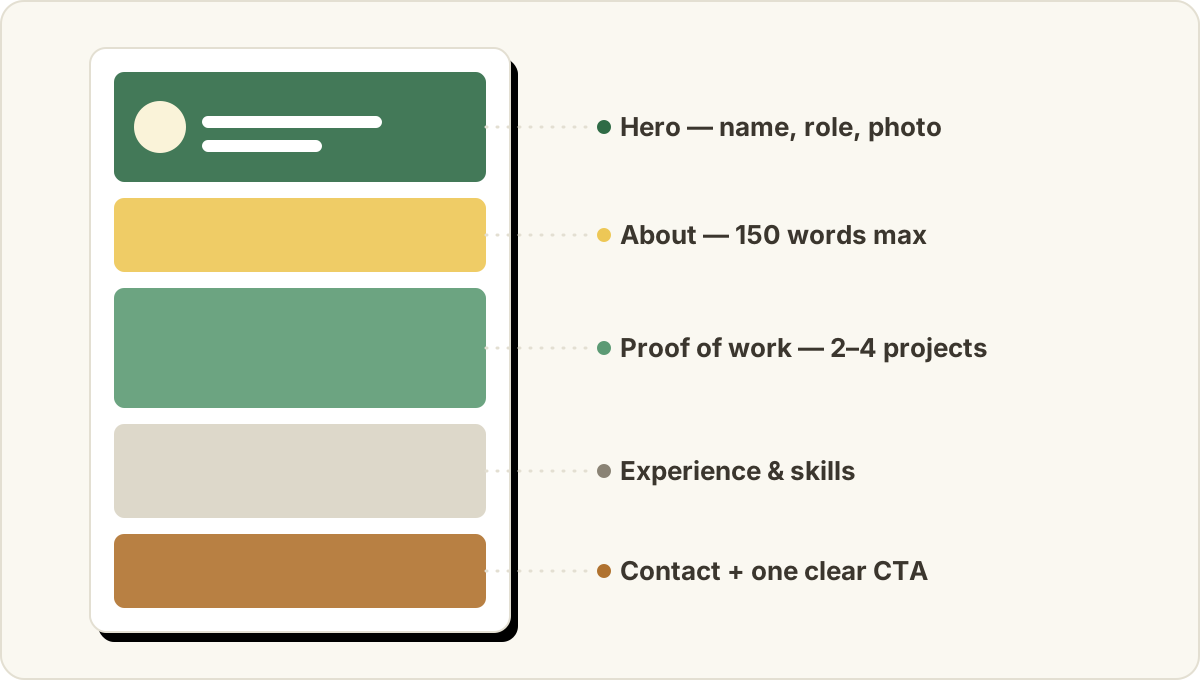
For most people, this order works top to bottom:
- Hero (name, role, photo)
- About
- Projects / proof of work
- Experience and skills
- Optional sections
- Contact + call to action
It mirrors how a recruiter reads: who are you → can you do the work → where have you done it → how do I reach you.
Common questions
How long should a personal website be?
One page is enough for most job seekers. Add separate pages only when a section outgrows the homepage — a project that deserves a full case study, or a blog. Depth of content matters more than number of pages.
Do I need a personal website if I have LinkedIn?
They do different jobs. LinkedIn is where recruiters search; your website is where you control the story, the design, and the depth. We compare them properly in personal website vs. LinkedIn — and cover whether you need a site at all in do you actually need a personal website?.
What about a custom domain?
yourname.com looks sharper on a resume and is easier to say out loud. It's worth getting once the site itself is solid — content first, domain second.
How do I actually build it?
You have three routes: code it yourself (full control, most time), use a general website builder (flexible, but you assemble everything), or use a tool built for this exact job. Unfold takes the third route — upload your resume, and the AI drafts the whole site with all six core sections, in about a minute. It's free to start, and you can switch between 18 templates instantly without rebuilding anything.
The checklist
Before you share your site, check:
- Name, role, and specialty visible in the first screen
- About section under 150 words, ending with what you want next
- 2–4 pieces of real work with outcomes
- Scannable experience and skills
- Contact info reachable in one click
- One clear call to action
- No typos — read it out loud once
- Loads fast and looks right on a phone
Ship it at 90% done. A live site you improve monthly beats a perfect site that never launches.